AX2278
Using Insert Axiom Query Data Range
You can use the Insert Axiom Query Data Range tool to define a data range for an Axiom query. This option is only available on the right-click menu if the file has a Control Sheet and if the current sheet is defined on it.
To insert an Axiom query tag:
- If the query is a vertical query, locate the row in the sheet where you want to start the data range. If the query is a horizontal query, locate the column in the sheet where you want to start the data range.
-
Right-click in any cell of that row or column, and then select Axiom Wizards > Insert Axiom Query Data Range > AQName.
The AQName will either be the default name, such as Axiom Query #1, or the name defined for the query on the Control Sheet. The following example shows the default name:
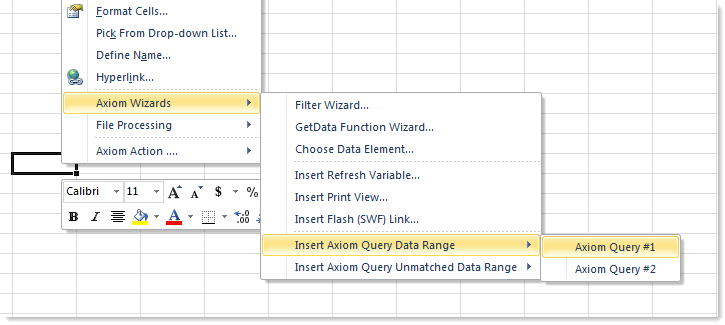
After you select a query, the Insert Data Range dialog opens.
- Do one of the following:
- If you want to insert the data range tags without a filter, then leave the Filter box blank and click OK.
- If you want to include a filter in the data range, you can either type a filter criteria statement into the Filter box, or use the Filter Wizard
 . Then, click OK.
Axiom finds the defined insert control column or insert control row for the query, and inserts Axiom query tags in the appropriate column or row, starting in the location where you right-clicked.
For example, if you right-clicked in row 25, and selected Insert Axiom Query Data Range > Axiom Query #1, the following tags would be placed in rows 25 and 26, in the designated insert control column for Axiom query #1 (for example, column A):
[aq1]
[stop]
If you specified a filter for the data range, the tags would be inserted as follows:
[aq1;dept.region='northwest']
[stop]
Once tags have been inserted, you can double-click the [aq#] tag to edit the filter.
NOTES:
- You can also use the Insert Axiom Query Unmatched Data Range option to insert a range to check for unmatched data. For more information, see Checking for unmatched data in an Axiom query.
- As an alternative to using this tool, you can use the arrow button
 to the right of the Axiom query name on the Sheet Assistant. This button inserts a plain set of tags at the current cursor location, in the insert control column or row.
