AX1728
When a plan file is active in an approval step, the plan file can either be approved forward to the next step in the process, or rejected back to a prior step. The rejection behavior that determines which step the plan file is returned to can be configured at the process level and at the step level. The plan file can return to one of the following: the previous step, the previous edit step, a specific step, or a user-defined step.
If the owner assignment causes the plan file to skip the target return step, then the plan file continues to move backward in the process to the next available non-skipped step.
Specifying the default rejection behavior for the process
For each plan file process, you can specify the behavior that applies by default when a plan file is rejected. This default behavior applies to all approval steps in the process, unless it is overridden for an individual step at the step level.
The default rejection behavior is specified on the Process Properties tab of the plan file process definition, in the Configuration Properties section.
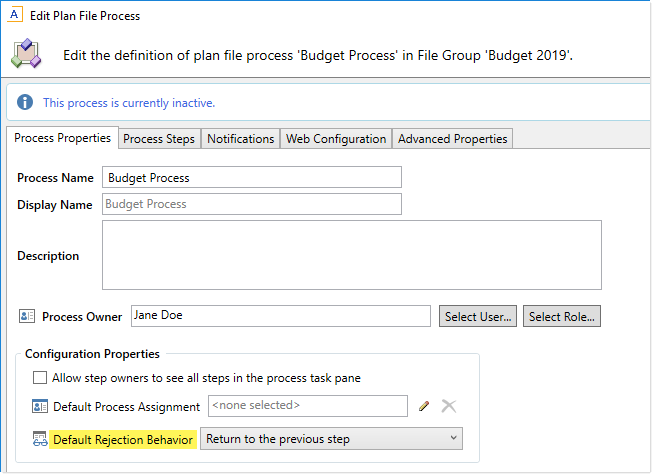
Default rejection behavior for the process
For Default Rejection Behavior, select one of the following:
-
Return to the previous step (default): When a plan file is rejected, it is returned to the previous step (regardless of what type of step it is).
-
Return to the previous Edit step: When a plan file is rejected, it is returned to the previous Edit Plan File step. If there are any approval steps in-between the rejected step and the previous edit step, they are bypassed.
-
Return to a step the user selects: When a plan file is rejected, the step owner chooses the return step. The plan file can be returned to any eligible previous step in the process. Previous steps are eligible for user-selected rejection behavior if the following step-level option is enabled: Show step as rejection choice for user selects rejection behavior.
For example, imagine that you have a plan file process with the following steps:
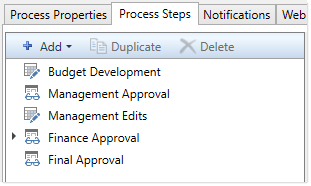
If a plan file is rejected from the Final Approval step, then by default it is returned to the immediately prior step of Finance Approval. However, if you configure the default rejection behavior to return to the previous edit step instead, then the plan file will bypass Finance Approval and instead return to Management Edits. And if you configure the default rejection behavior to return to a user-selected step, then the step owner can select any eligible step that comes before Final Approval.
Specifying step-specific rejection behavior
You can override the default step rejection behavior for individual approval steps as needed. This applies to Approval Process Steps and to Multiple Approvals Steps. If an Approval Process Step is a sub-step of a Multiple Approvals Step, then it uses the behavior configured on the parent step.
Select the step on the Process Steps tab of the plan file process definition, then configure the Step Rejection Behavior section of the Step Properties sub-tab as needed.
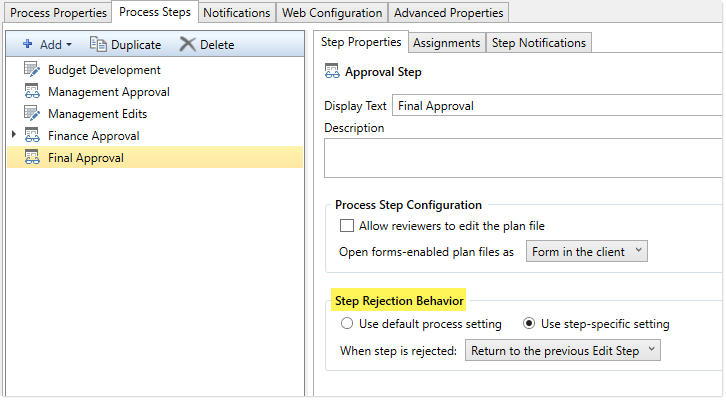
Step-specific rejection behavior
Select one of the following to determine how the plan file is handled if the step is rejected:
-
Use default process setting (default): The step uses the default rejection behavior as configured for the process on the Process Properties tab. When this option is enabled, the process-level rejection behavior is displayed below the option for reference.
-
Use step-specific setting: The step uses the rejection behavior configured for this specific step. The default rejection behavior does not apply. If this option is enabled, use the When step is rejected field to specify the step-specific rejection behavior:
-
Return to the previous step: The plan file returns to the previous step, regardless of the step type.
-
Return to the previous Edit step: The plan file returns to the previous Edit Plan File step, bypassing any approval steps that fall in-between.
-
Return to a specific step: The plan file returns to a specified step in the process. Use the Specific step to return to field to select the specific step. You can select any step that comes before the current step.
- Return to a step the user selects: When a plan file is rejected, the step owner chooses the return step. The plan file can be returned to any previous step in the process, as long as the following step-level option is enabled for the step: Show step as rejection choice for user selects rejection behavior.
-

Example step configured to reject back to a specific step
User experience for rejection behavior
When using any of the rejection options with a specific return step, the step completion dialog displays the return step and its assigned owner. The process automatically determines the target return step based on the configuration of the process definition.
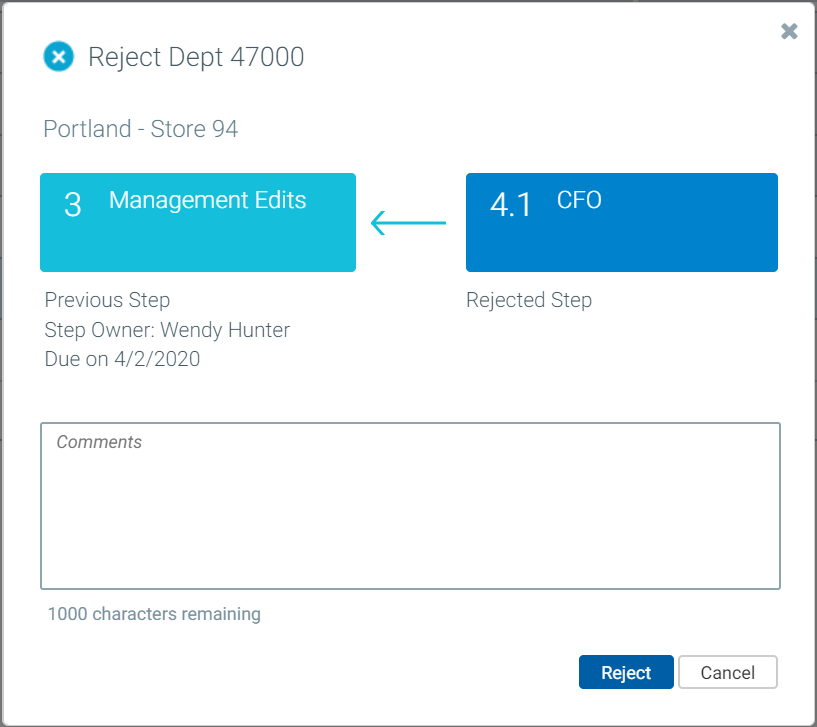
Example step completion dialog with predefined return step
When using the user-selects rejection behavior, the step completion dialog prompts the user to select the return step. This is presented as a drop-down list in the step progression diagram at the top of the dialog. In this case, the dialog does not display any details about the assigned owner for the selected return step.
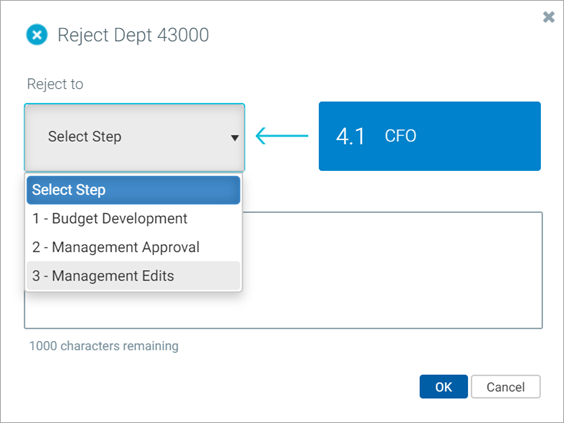
Example step completion dialog with user-selects return step
Keep in mind that it is possible to configure rejection behavior that does not make sense for some or all steps. For example, you can configure user-selects rejection behavior on step 2, but this does not make sense because the rejecting user will only ever be able to select step 1 as the return step. Additionally, if step 1 is excluded from user-selects rejection behavior, then the plan file will have no available return steps for the rejection. When configuring rejection behavior, you should carefully think through the process flow and make sure that the configuration will be valid.
