AX1617
You can display a list of plan file attachments in an Axiom form, and provide hyperlinks to open those attachments. You can display this list in any Axiom form, not just within the plan file. For example, you could have a form-enabled report that shows all of a user's plan file attachments (across multiple plan files).
You can set up this list as follows:
-
In the source file for the Axiom form, create an Axiom query to the Axiom.PlanFileAttachments table to return the desired list of attachments and the desired properties. In most cases you will want to apply a data filter to the query so that it is limited to a certain file group and to certain plan files within that file group.
-
In the in-sheet calc method for the Axiom query, use the HREF content tag for Formatted Grid components to generate hyperlinks for the attachments returned by the query. You can manually create the HREF tag and use the GetFormResourceURL function to provide the URL to the attachment, or you can use the GetFormResourceLinkTag function to automatically generate the HREF tag for you. For more information, see Using hyperlinks in Formatted Grids.
NOTE: If you are manually creating the HREF tag, do not include the UseNewWindow parameter. This parameter should be omitted when creating a hyperlink to a plan file attachment.
-
Set up a Formatted Grid component on the Axiom form canvas, using the Axiom query results as a data source for this grid.
The following screenshot shows an example Axiom query to the Axiom.PlanFileAttachments table, with the data tagged as a data source for a formatted grid. The field definition for the query is row 3 and the in-sheet calc method is row 4. Note that the [row] tag in B4 will be ignored because it is above the Grid data source tag; it is being used in the calc method to tag the rows returned by the Axiom query.

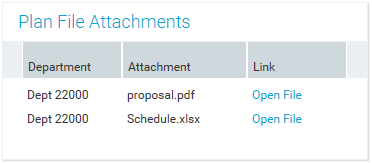
In the rendered Axiom form, the Formatted Grid component would appear as follows. Users can click on the "Open file" hyperlinks to open the associated attachments.