AX1277
The options available for end users to open Axiom forms in the Desktop Client General term for using either the Excel Client or the Windows Client, both of which are installed to the user's desktop. depends on the type of file (reports or plan files).
NOTE: This topic discusses ways to open Axiom forms directly in the Desktop Client. You can also open Axiom forms via hyperlinks within another forms (such as a home page form). For more information on setting up an Axiom form to contain hyperlinks to other Axiom forms, see Hyperlinking to other files in an Axiom form.
Form-enabled plan files
If a plan file is form-enabled, then it will automatically open as a form using all normal methods of plan file access—such as Open Plan Files, the Process task pane, and process notification emails. You do not need to specially configure this behavior.
When using the Windows Client, form-enabled plan files will open as web tabs within the application. When using the Excel Client, form-enabled plan files will open in the user's browser.
If you are an administrator or other power user who needs to open a form-enabled plan file as the source spreadsheet file, then you can right-click the file in Open Plan Files and choose Open as Spreadsheet.
Form-enabled reports
Generally speaking, if you want a form-enabled report to open as a form in the Desktop Client, then you must specially configure this access. When a form-enabled report is opened directly from the Reports Library, it will always open as the source spreadsheet file.
To allow end users to open the report as a web form, you can set up a custom task pane to open the file. You can link to the source report and then select the View As Form option. When the user double-clicks the item in the task pane, the report will open as an Axiom form.
If you want the Axiom form to open as a tab within the Windows Client, then you should also define the Axiom Tab Name; otherwise the Axiom form will open in the user's browser. When using the Excel Client, the form always opens in the user's browser.
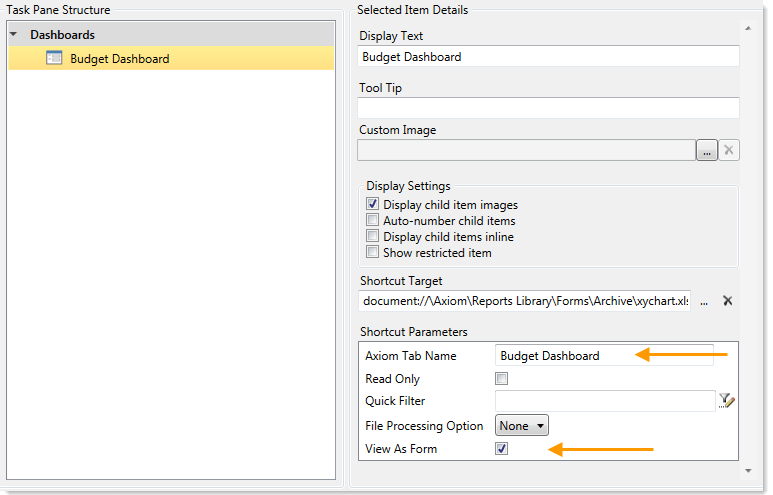
Example task pane configured to open an Axiom form
If you are linking the task pane to a folder instead of a specific file, then you can enable View Forms in Browser for the folder. This means that any form-enabled files in the folder will open as Axiom forms instead of opening as the source spreadsheet.
