AX2074
If the insertion behavior for an Axiom query is Insert Range, then you must define the range to be affected by the cell insertion. This is accomplished by placing [Startrange] and [Stoprange] tags in the same row or column as the [AQ#] tag (depending on the query orientation).
-
The [Stoprange] tag is required to identify the end of the range. If the [Stoprange] tag is omitted, then the end of the range is the used range of the sheet, which in most cases effectively defeats the purpose of using Insert Range. However, it can be omitted if this is the desired behavior.
-
The [Startrange] tag is optional to identify the start of the range. If the [Startrange] tag is omitted, then the start of the range is the [AQ#] tag. In many cases, this is the desired start of the range, so no additional tag is necessary. However, if you need the range to start "earlier," you can place the [Startrange] tag to the left or above the [AQ#] tag (depending on the query orientation). This may be necessary for certain advanced configurations such as nested queries, where you need the range to extend to include the tags of the "parent" query.
These tags specify the insertion range, and define the starting point and ending point of the field definition and the calc method. Cells are only inserted within this boundary.
The [Stoprange] and [Startrange] tags will only be honored if they are placed in the correct row or column, and in the correct locations.
- If the query is a vertical query, the [Startrange] tag can only be to the left of the [AQ#] tag, and the [Stoprange] tag can only be to the right of the [AQ#] tag, all within the same row.
- If the query is a horizontal query, the [Startrange] tag can only be above the [AQ#] tag, and the [Stoprange] tag can only be below the [AQ#] tag, all within the same column.
If the tags are in invalid locations, then they will be ignored, and the insertion range is determined as if the tags were omitted.
NOTES:
- The [Stoprange] and [Startrange] tags only apply when the insertion behavior is Insert Range. If the behavior is Insert Full Row/Column, the tags are ignored.
- For vertical queries, Insert Range is not supported for use with calc method libraries. If the [Startrange] and [Stoprange] tags are used in this circumstance, then the field definition will honor the range but the calc method will ignore it.
Horizontal queries
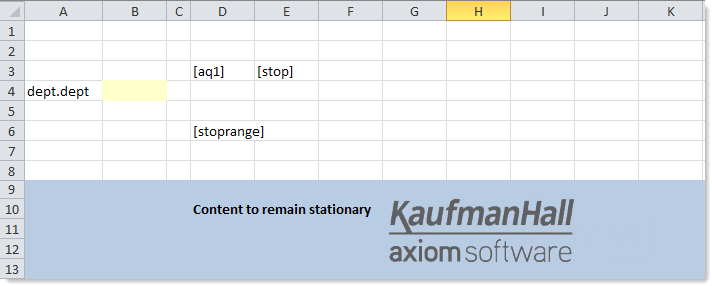
If the query is a horizontal query, then the [Stoprange] tag is placed below the [AQ#] tag, within the same column, to specify the outer limits of the field definition and calc method. When the query is run, anything above the [AQ#] tag and below the [Stoprange] tag will be unaffected. If needed, you can place the [Startrange] tag above the [AQ#] tag, within the same column.
The following example shows a horizontal Axiom query (before refresh):
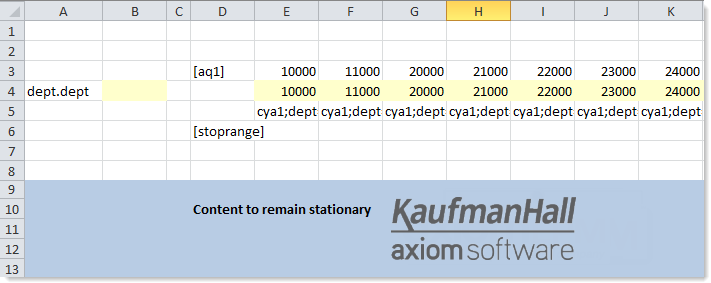
When the query is refreshed, the horizontal query is populated by inserting cells instead of inserting columns. The areas above the [AQ#] tag and below the [Stoprange] tag are unaffected.
Vertical queries
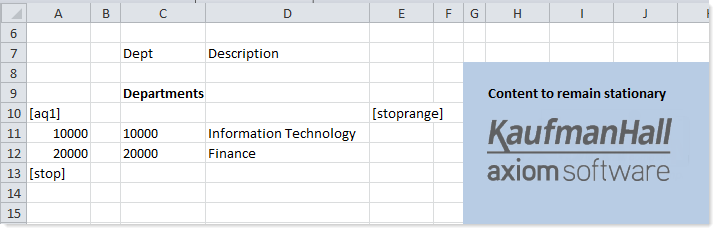
If the query is a vertical query, then the [Stoprange] tag is placed to the right of the [AQ#] tag, within the same row, to specify the outer limits of the field definition and calc method. When the query is run, anything to the left of the [AQ#] tag and to the right of the [Stoprange] tag will be unaffected. If needed, you can place the [Startrange] tag to the left of the AQ tag, within the same column.
The following example shows how a vertical Axiom query could be set up to use Insert Range. This configuration might be used for a "portal style" sheet, such as on the Axiom Software home page or on a Summary or Instructions sheet in a plan file. This is example is simply to show how the tags are placed—for a real implementation you would likely use some combination of freeze panes and views to hide the setup information.
Startrange example
For certain advanced configurations, the [Startrange] tag can be used to extend the affected range past the [AQ#] tag.
For example, if you have two nested Axiom queries, the tags of both queries must be kept in sync. If [Startrange] is not used, then when the "child" query is updated, the "parent" tags are not extended to encompass the range of the child query. To resolve this, you would use [Startrange] to specify the same starting range for both the parent and the child query.
In the following example, the [Startrange] for both queries is placed to the left of the [AQ1] tag. This ensures that the complete tags for both queries will move in synch as the queries are populated with data. This is not a real implementation example; the only purpose is to show how the tags would be placed for the nested queries.
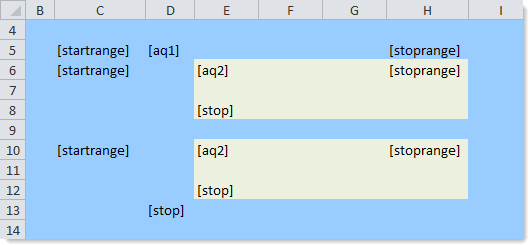
If this example was done without the [Startrange] tags, then the range for the child query would start at the [AQ2] tag, which means that AQ2 would populate downward but the [Stop] tag of AQ1 would not.
IMPORTANT: The [Startrange] tag cannot be placed "after" the [AQ#] tag. It must be placed "before" the [AQ#] tag, meaning that it must be either to the left of the [AQ#] tag (for vertical queries) or above the [AQ#] tag (for horizontal queries). The [Startrange] tag allows you to make the insert range larger by extending beyond the [AQ#] tag; it cannot be used to make the insert range smaller.
AX2074
