Release notes
TIP: Looking for release notes for all Axiom products, including current and previous versions? Click here.
NOTE: Download a PDF version of the release notes here.
Summary
Kaufman Hall is pleased to announce the 2019.4 release of Axiom Capital Planning. Each product release provides new features, enhancements, and configuration options to meet your needs. Many of these features and enhancements are a direct result of your feedback and suggestions.
NOTE: For the most updated release notes, view/download them from Axiom Help. After logging into your Axiom product, click the Main ribbon tab, and then click Online Help. At the top of the home page, click Release Notes.
Summary of the upgrade process:
-
Review product release notes – Review this document to familiarize yourself with the new features and functionality.
-
Schedule an installation date – Submit a request to your organization's Axiom Master System User (MSU) to contact support@kaufmanhall.com to schedule an installation date and time with at least three days of advance notice. The request should include the following information:
-
Desired Axiom Software platform version.
-
Desired Axiom for Healthcare product and version.
-
Indicate whether to first refresh the Axiom test sandbox with a copy of the production instance of Axiom and apply update(s) to it. If so, provide the soonest that Kaufman Hall can do this.
-
Propose an approximate two-hour downtime window when Kaufman Hall can apply update(s) to the production instance of Axiom during regular business hours, Monday through Friday 7 AM to 7 PM Central (except holidays recognized by Kaufman Hall).
-
-
Complete manual configuration updates – After installing the upgrade, review any manual setup steps needed to enable features for this version.
Help and Training
Kaufman Hall provides world-class resources at your fingertips directly within the Axiom Software system. Axiom Help provides topics, knowledge base articles, documents, webinar/training announcements, and videos to guide you through managing your system. To access these resources, do any of the following:
-
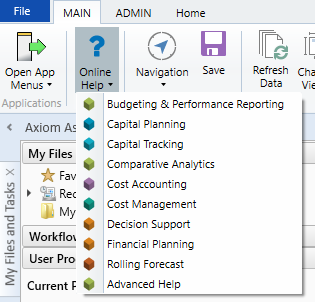
Online help - From the Main or Admin ribbon tab, click Online Help, and then select the product. Axiom Help opens in a new browser window. The online help will only open for products you are licensed to use.
-
Contextual help - Form/web-enabled features include contextual help directly within the user interface. This information provides a quick summary and/or instructions specifically related to the screen you are using. You can access this information by clicking the question mark in the upper right corner of the screen. For more detailed information, open Axiom Help by clicking Open Help at the top of the contextual help dialog.

Escalating to Axiom Support
As always, we appreciate your commitment to Kaufman Hall. If you have any questions about your upgrade, please contact us by logging into Axiom, navigating to the online help for your product, and clicking the Support at the top of the home page.
Product upgrade notes
IMPORTANT: You must apply the Axiom Software 2019.4 upgrade before applying any 2019.4 Axiom product upgrades. Axiom Software upgrades are backwards compatible so you can upgrade different products at different times, but you must upgrade to the Axiom Software 2019.3 before the first product upgrade. Refer to the Axiom Software 2019.4 Release Notes and Axiom Healthcare Suite 2019.4 Release Notes for considerations before upgrading. Apply this update ONLY if you have already applied the release and completed all the manual setup steps from the corresponding release notes.
When upgrading to the 2019.4 version of Axiom Capital Planning 2019.4, keep in mind the following:
- This product upgrade contains updated templates, calculation methods, driver files, and remediated defects.
- KHA delivered reports may be replaced. Any report that you saved under a different name or created new will remain untouched. Replaced reports are available in Document History, if needed.
- Any KHA delivered report that was moved to a new location will automatically move back to its original location.
- KHA product templates and calculation method libraries will be replaced.
- Product task panes will be replaced.
- Process definitions will not be replaced.
- Security roles and sub-systems will be reset to their configured settings. All user security exceptions you may have made will remain intact.
- Specific items configured as part your organization's implementation such as imports, exports, driver files, and process management files, will remain as is. Any required modifications to these areas are covered in the release notes, if required.
New features summary
See What's new.
2019.4 - Known issues resolved
The following tables list the resolutions for issues addressed in 2019.4, released on December 16th, 2019:
Excel and Web systems
| Issue | Description |
|---|---|
| PFB-07982 - PurchReq tax not rounded [TFS 38396] |
Issue: The system does not round the tax amount to the nearest penny, leading to inaccuracies in total PurchReq amounts, which then leads to inaccurate validation errors related to Available Adjusted Budget amounts. Resolution: Corrected by updating cells Y110 and Z110 to round to two decimal places (rounded to pennies). |
| PFB-08051 - More rounding fixes for PurchReq Template [TFS 39584] |
Issue: It can appear as though an item should make it in under the limit threshold, but the system is simply rounding the underlying value to display only two decimals ($100.89, for example). Resolution: Corrected by updating cells H149 and K149 with formula changes to round the values and save them to the database. |
| PFB-08272 - No DEPT available for the Freight line in a PurchReq [TFS 40847] |
Issue: All Freight lines in the purchase request are zero. The system does not default to the purchase request department in POTRANS or the CTREQ project DEPT. Resolution: Corrected in cell EE152 of the purchase request form. |
| PFB-08273 - Batch Number setting causing LineItemDetail sheet to not refresh [TFS 40858] |
Issue: When using the CT Purchase Request Import Utility to create a POTRANS and five line items in CTDETAIL, the user noted that the LineItemDetail sheet only contained the one templated detail row when rebuilding the plan file. Resolution: Corrected by resolving issues with AQ batching. |
| Capital Project Import Utility project type detail missing data [TFS 39921] |
Issue: If a project type detail value is added to the driver table, then a user cannot select it in the utility. Resolution: Corrected by sorting by columns B and C as well as added a new filter. |
| Original Budget Input Report doesn't have enough years [TFS 39904] |
Issue: The system only uses a small portion of ALL years when generating the report, which could potentially give false numbers back to the user. Resolution: Corrected by updating the Total row to include missing columns M:R, removed row() from the formulas in the Save row, and updated the logic to check for all zeroes to be both a Min and Max so that only an actual all-zero column will be hidden. |
| CT Transfer utilities missing CTDetail.DEPT save field [TFS 40327] |
Issue: The system added Default data in DEPT to the POTRANS and CTDETAIL legacy tables when it should only be added to the web version. Resolution: Corrected formulas in the Default Data - Structural and adjusted/corrected the save rows in the excel and web versions of the utility. |
| Capital Tracking Summary report issues [TFS 40376] |
Issue:
Resolution:
|
Web system only
| PFB-08140 - Capital transfers are overwritten when periods are in ProjectID [TFS 40147] |
Issue: If a transaction already exists, then the system should display an error rather than overwriting prior transfers. Resolution: Corrected by updating the formula in cell C151 to display an error if it finds a duplicate project ID. |
| Web Purchase Request Template Spacing Issues [TFS 39622] |
Issue: The system cuts off values in the bottom section of the form. Resolution: Corrected by updating the template formatting so that values display correctly. |
| Contractual Allowance methodology change error [TFS 39906] |
Issue: When a user selects a value other than Per Case and enters a value, it will save, but when the plan file is reopened the value disappears. The same happens for Ancillary and OP. Resolution: Corrected by updating the contractual allowance section of the calc method library to pull in the previously saved drop-down values for each of the drop-down sections and updated the changes in column D of AQ4. |
| Changing account values doubles entries when transferred from CP to CT [TFS 40124] |
Issue: Rows in the template duplicate because if the user has a Capital Planning and Capital Tracking system, the user would only ever set the Default GL account in Capital Planning. The template in Capital Tracking looks for the Default GL account in CT_Setup, even though the user already set this in Capital Planning driver, which caused duplicated rows. Resolution: Corrected by updating row 125 in the Variables sheet to not switch to CTSetup when in Capital Tracking. |
| POTRANS table department populating with 0 [TFS 40348] |
Issue: When creating a new purchase request, the system passes the values from Create_Open_PurchaseRequest to the POTRANS table. However, the POTRANS.Dept value is not included and, in the POTRANS table, this value's default is zero. When a new record is created, the zero initially gets saved to the table. When the user does not have access to Dept=0, a problem occurs. Resolution: Corrected by updating cell J12 in NewPurchaseRequest to bring in the department associated with the CAPREQ in the CTREQ table. NOTE: If you manually update utilities with a version including DEPT, be sure to also add DEPT to the POTRANS and CTDetail tables, otherwise the system will generate an error when saving data from the updated utilities. |
| Details tab error when date value removed [TFS 40600] |
Issue: When a user sets a text field to a date, clicks the X to blank out the value and then saves it, the tab displays an error on refresh. Resolution: Corrected by updating the formulas in Textfield column Y so that blanks (or NAs) remain blank on open or refresh. |
| POTRANS.DEPT & CTDetail.DEPT default data issue [TFS 41423] |
Issue: The system added Default data in DEPT to the POTRANS and CTDETAIL legacy tables when it should only be added to the web version. Resolution: Corrected formulas in the Default Data - Structural and adjusted/corrected the save rows in the excel and web versions of the utility. |
Excel system only
| Issue | Description |
|---|---|
| PFB-08128 - New purchase request form lists 'Completed' CAPREQs [TFS 39853] |
Issue: For some users, completed projects display in the CAPREQ list when creating a new purchase request. Resolution: Corrected by updating the filter in the new purchase request form. |
