Release notes
You can download a PDF version of the release notes here.
To access current and past release notes for all Axiom Healthcare products, click here.
Summary
Kaufman Hall is pleased to announce the 2019.3 release of Axiom Cost Accounting. Each product release provides new features, enhancements, and configuration options to meet your needs. Many of these features and enhancements are a direct result of your feedback and suggestions.
NOTE: For the most updated release notes, view/download them from Axiom Help. After logging into your Axiom product, click the Main ribbon tab, and then click Online Help > Cost Accounting. At the top of the home page, click Release Notes.
Summary of the upgrade process:
-
Review product release notes – Review this document to familiarize yourself with the new features and functionality.
-
Schedule an installation date – Submit a request to your organization's Axiom Master System User (MSU) to contact support@kaufmanhall.com to schedule an installation date and time with at least three days of advance notice. The request should include the following information:
-
Desired Axiom Software platform version.
-
Desired Axiom for Healthcare product and version.
-
Indicate whether to first refresh the Axiom test sandbox with a copy of the production instance of Axiom and apply update(s) to it. If so, provide the soonest that Kaufman Hall can do this.
-
Propose an approximate two-hour downtime window when Kaufman Hall can apply update(s) to the production instance of Axiom during regular business hours, Monday through Friday 7 AM to 7 PM Central (except holidays recognized by Kaufman Hall).
-
-
Complete manual configuration updates – After installing the upgrade, review any manual setup steps needed to enable features for this version.
IMPORTANT: Please read Manual configuration instructions for important information related to upgrading to this version.
Support
Kaufman Hall provides world-class resources at your fingertips directly within the Axiom Software system. Axiom Help provides topics, knowledge base articles, documents, webinar/training announcements, and videos to guide you through managing your system. To access these resources, do any of the following:
-
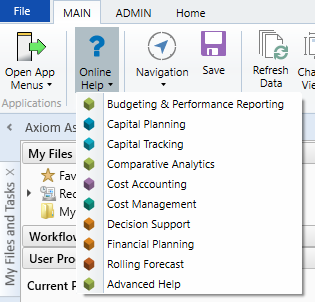
Online help - From the Main or Admin ribbon tab, click Online Help, and then select the product. Axiom Help opens in a new browser window. The online help will only open for products you are licensed to use.
-
Contextual help - Form/web-enabled features include contextual help directly within the user interface. This information provides a quick summary and/or instructions specifically related to the screen you are using. You can access this information by clicking the question mark in the upper right corner of the screen. For more detailed information, open Axiom Help by clicking Open Help at the top of the contextual help dialog.

Escalating to Axiom Support
As always, we appreciate your commitment to Kaufman Hall. If you have any questions about your upgrade, please contact us by logging into Axiom, navigating to the online help for your product, and clicking the Support at the top of the home page.
Product upgrade notes
IMPORTANT: You must apply the Axiom Software 2019.3 upgrade before applying any 2019.3 Axiom product upgrades. Axiom Software upgrades are backwards compatible so you can upgrade different products at different times, but you must upgrade to the Axiom Software 2019.3 before the first product upgrade. Refer to the Axiom Software 2019.3 Release Notes and Axiom Healthcare Suite 2019.3 Release Notes for considerations before upgrading. Apply this update ONLY if you have already applied the release and completed all the manual setup steps from the corresponding release notes.
When upgrading to the 2019.3 version of Axiom Cost Accounting, keep in mind the following:
- This product upgrade contains updated templates, calculation methods, driver files, and remediated defects.
- KHA delivered reports may be removed or replaced. Any report that you saved under a different name or created new will remain untouched. Replaced reports are available in Document History, if needed.
- Any KHA delivered report that was moved to a new location by the client will automatically move back to its original location.
- KHA product templates and calculation method libraries will be replaced.
-
Process definitions will not be replaced. Process Manager will not currently work with the new system tables and web-based pages and utilities. Consequently, please plan on reviewing and potentially revising any Cost Accounting Process Definitions depending on the scope and what tasks have been created and are in use.
-
Security roles and sub-systems will be reset to their configured settings for the Axiom defined roles. All security exceptions you may have made at the individual user level will remain intact.
-
Specific items configured as part of your company or organization's implementation such as imports, exports, driver files, and process management files, will remain as is. Any required modifications to these areas are covered in the release notes, if required. For example, Process Manager defined processes for Cost Accounting will need to be modified by Client Success and has limitations with accessing web-based tasks.
New features summary
See What's new.
2019.3 - Known issues resolved
The following table lists the resolutions for issues addressed in 2019.3, released on September 16th, 2019:
| Issue | Description |
|---|---|
|
PFB-07324
|
Issue: When reviewing the Markup Costing results, the system still displays variances after running the Misc Variances reclasses. This was occurring for departments where there was no CGL expense for that cost category. Resolution: Corrected by updating transform steps where CGL Offset records are created (currently Transforms 21, 22, 25, and 26). |
| PFB-07444 - Widen CostItem column in Cost Item Method Assignment form [TFS 38099] |
Issue: When viewing longer cost item codes in the Cost Item Method Assignment form in the browser, the last two to three characters are cut off. Resolution: Corrected by updating the column width. |
| PFB-07884 - Allocations not excluding source from Basis - Simultaneous Equation processing [TFS 38580, 38040] |
Issue: Allocations only fail to exclude a source department from the basis when there is not qualifying CGL data in the broader source filter. Resolution: Corrected by implementing a method the system retrieves the departments from the DEPT table rather than the CGL table. |
| Dimensions - Delete a record that has been filtered to be the only visible record causes save error - it didn't before [TFS 31607] | Issue: The system displays an error message under the following conditions:
Resolution: Corrected by updating the delete function to delete the rows even if they have not been previously saved. |
| ReconUC_02_3_Cost Results to Costing GL by Dept and Cost Category - Dev Data left behind [TFS 32937] |
Issue: There is no "Default" cost set. Variables!H14 should remain blank so that the system does not display an error message the first time a client opens the report. Resolution: Corrected by clearing the selected value from the refresh variable and set the refresh variable to clear on open. |
| CGL Table Grid seems to want to open CGL2017 and we only have CGL2018 in a new install [TFS 35840] |
Issue: When trying to open the CGL table when setting up a new manual statistic, the system displays an error message. It identifies a CGL2017 and that table does not exist. Resolution: Corrected by changing the table to CGL2019. |
| Viewing the preview of a cloned allocation/reclass definition prior to save does not work [TFS 35859] |
Issue: When viewing a preview of an allocation or reclass that has been created from a clone before the definition is saved, the preview screen displays jumbled elements and an error displays in the dev tools console tab. Resolution: Corrected by updating how the system re-renders the data grid after the initial creation. |
2019.3.1 - Known issues resolved
| Issue | Description |
|---|---|
|
RVU Maintenance - Page does not load in IE [TFS 39243] |
Issue: When navigating to the RVU Maintenance page using Internet Explorer, an error displays and the page loads inactive elements. Resolution: Corrected by updating the method used to be compatible with Internet Explorer. |
| PFB-08050 - Audit_01 Income Statement Summary should include 'Non Operating Revenue - Other [TFS 39094] |
Issue: The Audit_01 Income Statement Summary report should include the Non Operating Revenue – Other similar to how the Income Statement By Entity includes the field, otherwise there will be discrepancies between the two reports. Resolution: Corrected by adding the "NonOpOther" value into the Non-Operating Income section of the Income Statement Summary. |
Manual setup instructions
IMPORTANT: You must upgrade to 2019.1 prior to upgrading to 2019.3.
Known issues
The following table lists the known issues in this release:
| Issue | Description |
|---|---|
| PFB-05803 - CostLastUpdate not being populated [TFS 16305] |
Issue: The field Encounter.CostLastUpdate field is not being populated when costs are updated by the cost assignment process. Resolution: Under consideration for future release. |
| PFB-06711 - Re-Processing Micro and Reverse Markup after RVU, RCC and RCU [TFS 26854] |
Issue: Markup unit cost calculations after the RVU, RCC, and RCU unit cost calculations have been processed, the user is advised to clear ALL of the cost offset accounts from the CGL prior to re-processing of Micro and/or Reverse Markup unit cost calculations and then re-process the RVU, RCC and RCU cost methods. The reprocessing of these method and their new offsets create new values to be allocated. Any changes in methods within the department may not have impact the deletion of these pseudo accounts. Transforms 18 and 19 of the Markup and Micro Cost GL and CostResults Postings only insert and update the micro and reverse markup cost offsets. If these transforms are not to be edited, then clients need documentation to ensure that the CGL is cleared of all cost offset accounts before re-processing of the micro and reverse markup and then remaining RVU, RCC and RCU cost methods. Resolution: Under consideration for future patch or release. |
| PFB-06955 - Transaction & Micro Cost & Reverse Markup Processing [TFS 29217] |
Issue: When using the Transaction & Micro Cost & Reverse Markup Processing Utility, the system fails to create CGL Offset Accounts. Resolution: Under consideration for future patch or release. |
| PFB-07742 - CostMapped child Depts w/ Rev but no Exp [TFS 38100] |
Issue: Costs are not updated in target tables for Child departments (i.e. they are Dept.CostMapped to a parent department) in cases where the Child department has Revenues in the CGL table but have no Expenses in the CGL table. Resolution: Under consideration for future patch or release. |
| PFB-07748 - Unit Cost Recon Reports Refresh Issue [TFS 38039] |
Issue: Some of the Unit Cost Reconciliation reports have to be refreshed twice to bring in the correct data. This was discovered in the "ReconUC_02_1_Cost Results to Costing GL by Dept" report but likely impacts other costing reports that are set up the same way. This only happens in the Excel Client. Resolution: Under consideration for future patch or release. |
| PFB-07948 - CGL.TOT does not equal sum of P1 through P12 for some Microcost Offset accounts [TFS 38312] |
Issue: While troubleshooting Microcost, the TOT column on the CGL did not tie to the sum of columns for P1 through P12. Resolution: Under consideration for future patch or release. |
| Core Dimensions - Unable to copy one cell and paste to multiple cells at once and have it replicate multiple times [TFS 30757] |
Issue: When copying content from a cell to multiple cells, the system only applies the copied content to one of the multiple cells. Resolution: Under consideration for future patch or release. In the meantime, you can do the following as a workaround:
|
| ReconUC_02_2_Cost Results to Costing GL by Cost Category - Requires two refreshes [TFS 32934] |
Issue: The ReconUC_02_2_Cost Results to Costing GL by Cost Category should not require two refreshes. Resolution: Until this is patched, the user will need to refresh twice to populate the report. |
| Allocation definitions with single quotes in the title cause scheduler jobs to fail [TFS 34431] |
Issue: If an allocation definition includes single quotes in its title, the scheduler job "Allocation Processing" fails during processing. Resolution: Under consideration for future patch or release. |
| Orphaned records created after deleting a processed reclass or allocation rule [TFS 35717] |
Issue: Users can possibly create an orphaned record by deleting a rule that had been previously processed. After deleting the rule through the web interface, when processing either reclasses or allocations again, all the records for the rule that had been deleted are still present in the CGL table. Resolution: Users cannot recreate the rule with the same definition ID since that column is an identity data type. At this point, the only way to clear the orphaned records is to manually delete them. |
| Information panel does not refresh completely when switching between multiple cost processes [TFS 36156] |
Issue: Information panels on the checklist page do not refresh correctly when switching to different cost processes. Resolution: Under consideration for a future patch or release. |
| Performance of switching between costing processes is slow [TFS 36172] |
Issue: When switching between processes that include a large majority of the checklist items marked as complete, the process takes about ten seconds to load. The system does not indicate to the user that this is happening, making it seem that the page is not making the switch. Users can still interact with the page elements, clicking the process multiple times thinking it should work. Resolution: Under consideration for future patch or release. |
| Reclass processing by a single reclass method [TFS 36245] |
Issue: An issue occurs when processing a reclass by a single method group when reclass definitions depend on reclass rules not within the selected reclass method group. Resolution: Under consideration for future patch or release. |
| APRDRG table date columns cannot be edited and saved from the dimension maintenance page [TFS 36259] |
Issue: When trying to edit the date columns, the system displays an error. Resolution: At this time, you can edit the columns from the dimension tables in the Windows or Excel Clients. This issue is under consideration for future patch or release. |
IMPORTANT: Refer to the Axiom Software 2019.3 Release Notes and Axiom for Healthcare Suite 2019.3 Release Notes for additional known issues that have a suite-wide impact.
