AX1728
When a plan file is active in an approval step, the plan file can either be approved forward to the next step in the process, or rejected back to a prior step. The rejection behavior that determines which step the plan file is returned to can be configured at the process level and at the step level. The plan file can return to the previous step, or to the previous edit step, or to a specific step.
If the owner assignment causes the plan file to skip the target return step, then the plan file continues to move backward in the process to the next available non-skipped step.
Specifying the default rejection behavior for the process
For each plan file process, you can specify the behavior that applies by default when a plan file is rejected. This default behavior applies to all approval steps in the process, unless it is overridden for an individual step at the step level.
The default rejection behavior is specified on the Process Properties tab of the plan file process definition, in the Configuration Properties section.
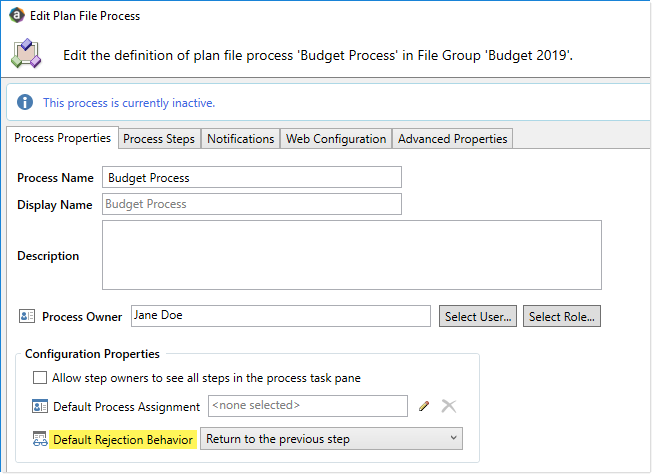
Default rejection behavior for the process
For Default Rejection Behavior, select one of the following:
-
Return to the previous step (default): When a plan file is rejected, it is returned to the previous step (regardless of what type of step it is).
-
Return to the previous Edit step: When a plan file is rejected, it is returned to the previous Edit Plan File step. If there are any approval steps in-between the rejected step and the previous edit step, they are bypassed.
For example, imagine that you have a plan file process with the following steps:
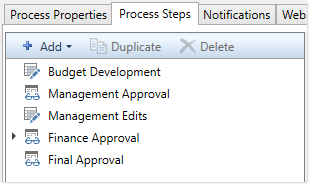
If a plan file is rejected from the Final Approval step, then by default it is returned to the immediately prior step of Finance Approval. However, if you configure the default rejection behavior to return to the previous edit step instead, then the plan file will bypass Finance Approval and instead return to Management Edits.
Specifying step-specific rejection behavior
You can override the default step rejection behavior for individual approval steps as needed. This applies to Approval Process Steps and to Multiple Approvals Steps. If an Approval Process Step is a sub-step of a Multiple Approvals Step, then it uses the behavior configured on the parent step.
Select the step on the Process Steps tab of the plan file process definition, then configure the Step Rejection Behavior section of the Step Properties sub-tab as needed.
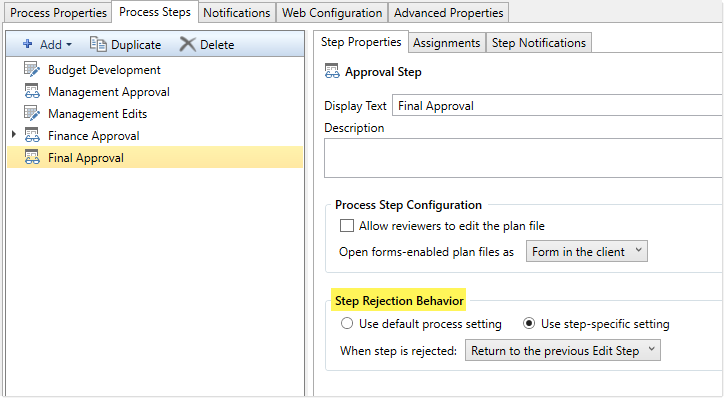
Step-specific rejection behavior
Select one of the following to determine how the plan file is handled if the step is rejected:
-
Use default process setting (default): The step uses the default rejection behavior as configured for the process on the Process Properties tab. When this option is enabled, the process-level rejection behavior is displayed below the option for reference.
-
Use step-specific setting: The step uses the rejection behavior configured for this specific step. The default rejection behavior does not apply. If this option is enabled, use the When step is rejected field to specify the step-specific rejection behavior:
-
Return to the previous step: The plan file returns to the previous step, regardless of the step type.
-
Return to the previous Edit step: The plan file returns to the previous Edit Plan File step, bypassing any approval steps that fall in-between.
-
Return to a specific step: The plan file returns to a specified step in the process. Use the Specific step to return to field to select the specific step. You can select any step that comes before the current step.
-
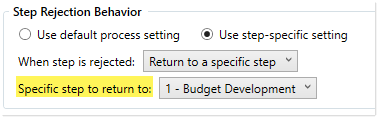
Example step configured to reject back to a specific step
